
SwipeClean: cleaning photos with gestures on iOS
How I built SwipeClean GHV: Photos, an iOS app with SwiftUI and PhotoKit for reviewing photos, finding duplicates and deleting with local confirmation.
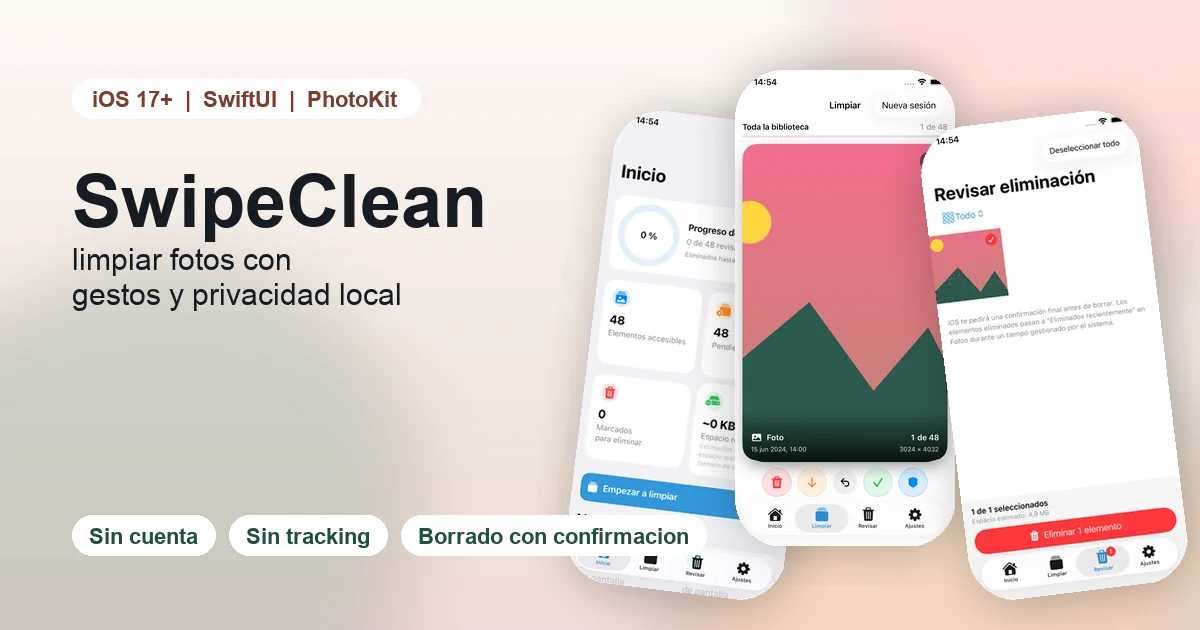
SwipeClean GHV: Photos is a native iOS app I built to solve a very specific problem: photo libraries grow much faster than people organize them. Screenshots, repeated photos, large videos and files that no longer matter accumulate quietly, but cleaning them is slow, boring and slightly risky.
The short answer about the project is this: SwipeClean turns photo and video cleanup into a visual review flow based on gestures. The app shows each asset as a card and lets the user decide whether to keep it, send it to deletion review, skip it for now or protect it. The important detail is that swiping never deletes anything directly. Everything goes through a review queue first, and when the user confirms, iOS asks again through PhotoKit.
Update (August 2026): SwipeClean passed Apple's review and is now publicly available for free on the App Store, no TestFlight required. Read the launch article.
Project summary
| Area | Result |
|---|---|
| Product | Native iOS app for cleaning photos and videos |
| My role | Sole designer and developer |
| Stack | Swift, SwiftUI, PhotoKit, PhotosUI, Vision, AVFoundation |
| Platform | iPhone, iOS 17+ |
| Privacy | No account, no ads, no tracking and no data collection |
| Status | Version 1.0 build 1 submitted to App Store Connect |
| TestFlight | External group prepared for beta testers |
| Model | Free app, with manual release after Apple approval |
The goal was not to build an app that decides for the user. The goal was to make it easier to make decisions about a personal library. With photos, trust matters more than aggressive automation.
The problem: photo cleanup has a high mental cost
A large photo library is not difficult only because of the number of files. It is difficult because each decision has context:
- a screenshot can look useless but contain information you need;
- a blurry photo can still have emotional value;
- a large video can take a lot of space but be impossible to recreate;
- two very similar photos can have tiny differences that matter.
That is why SwipeClean is not built around a magic "delete everything" button. The product reduces friction while keeping control. The user reviews, the app suggests, and final deletion is protected by two confirmations.
The core flow: a decision deck
The heart of SwipeClean is the swipe deck:
- swipe right: keep;
- swipe left: send to deletion review;
- swipe down: skip for now;
- swipe up: protect.
This model fits a repetitive action: look at a photo, decide and move to the next one. At the same time, it avoids a common risk in cleanup apps: making the gesture itself destructive. In SwipeClean, the gesture only classifies. Real deletion happens on a separate review screen.
Safe deletion with PhotoKit
The app uses PhotoKit, Apple's framework for interacting with the photo library. SwipeClean does not delete files by itself and does not bypass system controls.
The deletion flow is intentionally conservative:
- The user marks assets during the session.
- The app groups them in a review queue.
- The user reviews the queue inside SwipeClean.
- The user confirms deletion.
- iOS shows the system confirmation.
This approach reduces mistakes and increases confidence. When a product works with a personal library, the feeling of control is part of the product.
Local suggestions, not surveillance
SwipeClean includes suggestions to speed up review: possible duplicates, similar photos, screenshots, large videos and items that may be blurry. The idea is to prioritize what deserves a look first, not to replace human judgement.
The app combines native building blocks:
- PhotoKit and PhotosUI for controlled access to photos and videos;
- Vision feature prints for similarity and duplicate suggestions;
- AVFoundation and AVKit for video playback inside the flow;
- Swift Concurrency and Observation to keep the UI responsive;
- local JSON persistence for sessions, decisions and preferences.
All analysis runs on the device. There is no account, backend, advertising or third-party analytics. This matters because a photo app works with highly personal content. Privacy should not depend only on a promise; it should be part of the architecture.
Privacy by design
SwipeClean's privacy declaration states that the app collects no data. The public support and privacy website explains why: photos, videos, thumbnails, metadata, decisions and preferences are processed locally.
If the user has iCloud Photos enabled, iOS may download thumbnails or originals through Apple's own services to display or play them. SwipeClean does not send that content to developer or third-party servers.
This decision also simplifies the product:
- no login is needed;
- there is no external sync;
- there is no behavior tracking;
- the main flow does not depend on connectivity;
- uninstalling the app removes its local storage.
What I learned building SwipeClean
SwipeClean forced me to think carefully about product safety. In a training app such as GymTracker, a bug can be annoying. In a photo library app, a bug can be emotionally expensive. That changes the design process.
The main lessons were:
- UX should communicate risk through the flow, not long explanations. If nothing is deleted by swiping, the user can explore without fear.
- Suggestions need to stay humble. A similar photo is not always a duplicate, and a technically weak photo can still be important.
- Privacy works best when it is a technical constraint. With no backend and no analytics, there is less risk surface.
- Intermediate states matter. Skip, protect and review later are as important as keep or delete.
Current status
Version 1.0 build 1 has been submitted to App Store Connect. The app is configured as free, rated 4+, available in 175 countries/regions, set to manual release and declared as collecting no data.
I also prepared an external TestFlight group so friends and early testers can try it before the final public release. The public link is:
If Apple has not approved the external beta yet, the link may not allow testers to join. Once beta review is approved, it should work automatically for available tester slots.
Conclusion
SwipeClean is the kind of product I like building: small, focused and careful. It does not try to do everything. It tries to solve one real task well: reviewing a large photo library without losing control over what gets deleted.
The project connects several areas I keep developing: native iOS, safe product flows, local privacy, automation of repetitive decisions and real product publication. You can check the SwipeClean project page or the public support and privacy website.